





AI AND WORK. IN ONE PLACE.

Create with AI.Bring work together.

Create images and video. Work with specialist AI agents. Organize your projects, tasks and customer tickets.

Start free. Top up AI credits as you go.

Models for thinking and creating.

For conversations, images, video and audio. Choose what fits your work.

  • ChatGPTChat
  • ClaudeChat
  • GeminiChat
  • GLMChat
  • Gemini OmniVideo
  • VeoVideo
  • KlingVideo
  • Nano BananaImages
  • GPT ImageImages
  • FLUXImages
  • ElevenLabsAudio

Model availability depends on platform settings and your account permissions.

THE ZAKZEE PRODUCTS

More of what you do. In one place.

From your first idea to the work that follows.

01 / Creative Studio

From your brief to content you can use.

Images, video and audio. Choose what you want to make, find an available model, then prepare your work for what comes next.

Choose an idea to explore its process

Illustrative AI artwork, not generation records from Zakzee.

Architectural imagery

Imagine a space before it exists

Explain a spatial idea, explore materials and light, or add a visual direction to your project.

A suggested starting brief
A natural stone courtyard around a reflecting pool, with a violet curtain in gentle dusk light.
A suggested brief to try, not this artwork’s original input. Check the model options available to your account.
Creative control

Your idea. Your creative decisions.

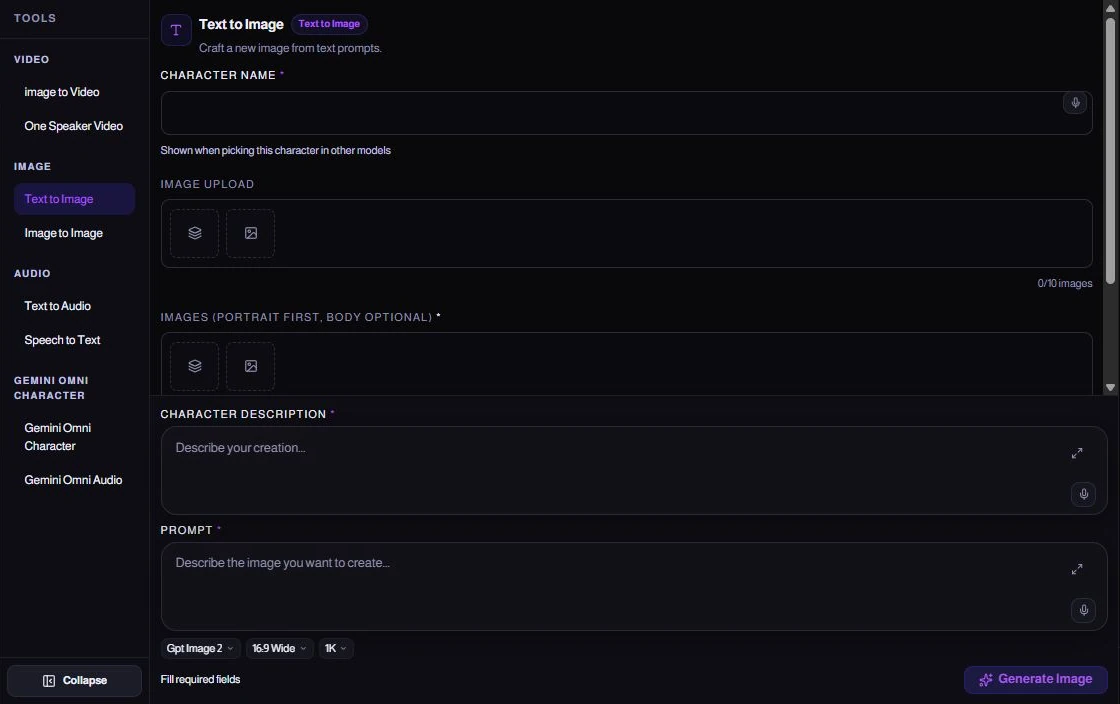
Start with the category and creation mode. Your model determines which fields, references and options appear.

  • Images, video and audio through enabled modes
  • A written brief and supported references
  • Cost review and confirmation before submitting
See the Studio tools
Actual Studio interface with the brief, references, model selection and options
Actual Zakzee Studio interface capture
Project Management

Tasks. Owners. Deadlines. A clearer picture of the work.

Plan the work, name its owner, and follow deadlines and reviews through to delivery.

Explore project management
A new product launchIllustrative example · sample data
Project ManagementDrag a card to another stage
In progress2
High
Review the brief
Medium
Prepare the visuals
Review0
Ready1
Medium
Client review
Review the brief

Demo board · changes stay local and are not saved

Swipe horizontally to explore the stages.

Ticketing SystemClient Portal

A simple view for customers. A clear path for your team.

Keep the customer conversation private and the execution work linked. Your team reviews the solution before closing the request.

Explore the ticketing system
Sample TKT-000128

The website contact form needs a fix

Open
  1. 01

    A clear request

    Customer view
    N
    NourSample
    The contact form stops before sending. Please check the attached screenshot.
    contact-form.png · sample attachment
  2. 02

    The right team

    Team workspace
    Linked workWebsite maintenance

    Fix contact-form submission

    Required for resolution
    Work still in progress
    MMaya
  3. 03

    A reviewed resolution

    Team workspace
    • Work still in progress
    • Review before closure
    Open

    Closing waits for the linked work.

Illustrative example · sample data

04 / AI AGENTS

Insight first. Your next move, clearer.

Work with advertising accounts through specialist tools. Move from a performance question to a prepared Meta campaign, with the account, scope and next action in view.

  • Ask about a specific account
  • Prepare a complete Meta campaign
  • Use the right specialist
Explore AI agents
Meta AdsExample account · Product launch

What is happening in the account?

Spend
$420
Results
84
Cost per result
$5.00
Illustrative daily results
  1. 01Understand performance
  2. 02Prepare a paused campaign
  3. 03Explicitly request activation

A later, explicit user request is required to activate the prepared campaign.

Interactive explanation · synthetic account and results
Explore the specialist toolsets

CRM data

Example connected tools
01Contacts
02Opportunities
03Calendars

Available tools depend on the assistant, your access and enabled connections.

This explanation does not connect an account, create an ad or spend money.

MORE OF YOUR TOOLS. ONE CONNECTED PICTURE.

For everyday thinking. And the relationships that follow.

AI Chat

Your next idea starts with a conversation.

Ask, write and explore ideas with the chat models available to you.

Product brief.txt

A new reusable bottle. Audience: daily commuters. Focus: light weight, fewer disposable bottles.

A file gives the conversation context.
Illustrative answer

What matters in this file?

Lead with the everyday benefit: a lighter journey, with a bottle you can use again.

Sample files and prepared illustrative answers
  • Choose an available model
  • Give the question context
  • Speak to type
Explore AI Chat

Model names illustrate the choice. Availability, file support and tools depend on the model configured for your account. Switching here does not call a model.

CRM

A clearer picture of every relationship.

Explore contacts and opportunities through a permitted CRM connection, with the separate CRM application one click away.

LContact in focus

Lina

Opportunity
Website project
Channel
Email

Connected CRM illustration · read-only sample

  • Find a contact
  • Understand an opportunity
  • Recover the conversation context
Explore CRM

CRM has its own application and sign-in; your Zakzee session does not sign you in automatically.

Chatbot

Open the companion Chatbot application with its own sign-in and access.

  • Dedicated application
  • Own sign-in
  • Direct access
Explore product

WhatsApp

Use an enabled WhatsApp connection to talk to the assistant and make supported task requests.

  • Conversation context
  • Task requests
  • Permitted destinations
Explore product

Workspace

Work on your own or with others, with member and role controls available to authorized managers.

  • Personal or shared
  • Members & roles
  • Access controls
Explore product

Automations

Explore configured project-stage rules, their conditions and available actions.

  • Project triggers
  • Conditions
  • Configured actions
Explore product
Zakzee

For the way you work.

One person, a growing business, or a whole team.

01

Your everyday ideas

Think through a question, work with a file, or create something just for you.

ThinkWriteCreate
02

Your business, whatever it is

Make product visuals, explore content ideas and keep your projects in view.

ProductsContentProjects
03

Your work with others

Coordinate tasks, review work and follow client requests in context.

PeopleReviewsRequests
Credits, clearly

One balance. Room to explore.

Use credits for supported AI operations. Pricing varies by model and operation; check the cost and your available balance before generating.

View credits
01Choose an available model
02Review its settings and cost
03Create with your credit balance
Before you start

A few clear answers.

AI-created violet glass perfume bottle on a chrome ribbon
Is Zakzee only for businesses or agencies?

No. You can use AI Chat and Studio on your own, or work with others in a shared workspace. Available tools and models depend on your account and access.

What can I create?

Studio includes image, video and audio tools. Choose a tool, then a model available to your account; references, settings and supported operations vary by model.

Can my clients review work or open requests?

Authorized users can share review and client portal access. Tickets require a configured shared ticket project. Verification and permissions determine what each client can see.

How do credits work?

AI cost depends on the model, operation and settings. Review the displayed cost and your balance before generating. Introductory credits depend on account eligibility.

Are CRM and Chatbot part of the same sign-in?

They open as separate applications and may require their own sign-in.

Where can I find help?

After signing in, open Help & Support, then User guide when available to your account. You can also contact us on WhatsApp to ask about the platform.

AI-created travertine courtyard, reflecting pool and violet curtain at dusk

Start with what is on your mind.

Your next idea has a place here.

Ask us on WhatsApp